Showing posts with label tools. Show all posts

Friday, June 05, 2009

Addition to the the toolbox

About 18 months ago, I published a series of posts about Tools for Ham Radio. I haven’t really done any updates there since I published, so I’m going to try to occasionally write about either updates to the tools that I mentioned or new tools that I’ve found.

I’ll start off with K2DSL’s Maidenhead Grid Square Locator. This belongs in Part 4 of my series, The Internet Tool. What David has done is to create a simple web application that will take any one of several pieces of information such as an address, a callsign, or a 4 or 6 digit grid square and return a map showing that Maidenhead grid square.  This will primarily be of interest to operators working on 6m and higher, although there are some HF awards that require the grid square as well.

Here’s a little tip for you: Since the mapping functionality is powered by Google Maps, in the address field you can put in anything that Google Maps recognizes, such as landmarks, airports, or parks. For example, if you enter “High Point State Park” you’ll see where I’ll be operating with my club during the upcoming VHF QSO Party next weekend.

Tuesday, March 04, 2008

Quick update

Just a couple of quick notes: Thanks to those of you who voted in my "Do you use Logbook of The World" poll. The end results were that nine of you said you used it, four said it was too complicated to use, and one said they didn't log electronically.

The other thing is that I've had a couple of people either ask me directly or post a link elsewhere about my Ham Radio Tools series that I did a while back. To make the series a little easier to find, I've put a box on the right-hand side so that you can pull up the individual posts more easily.

Friday, December 21, 2007

Tools for Ham Radio - Part 4

This is the fourth (and final, for now) part of a series that I'm doing on software tools for ham radio. I've written some background in part 1, and you can find parts 2 and 3 in my blog as well.

The Internet Tool

Some people think that calling the Internet a tool isn't quite fair. I disagree, and view it as a source for other tools; a meta-tool if you will. Using the Internet, you can find almost anything that you'll need, including all the of the tools that I've mentioned previously.

I'm going to focus, briefly, on a few sites that I use regularly. Again, as with the other tools, these are sites that I happen to use fairly often and like. There are others that provide similar information, and there are thousands of others that I have yet to find.

So, in no particular order, here we go:
  • qrz.com: The mother of all callsign lookup sites. Aside from having all US callsigns automatically populated and updated, many (most?) DXers and contesters have their callsigns, mailing addresses, and email addresses listed here. If for some reason you haven't heard of this site, you probably don't have an Internet connection (and haven't been on the air much, since a lot of stations will now say "QSL via qrz.com".)
  • Propagation info at http://dx.qsl.net/propagation/: Although there are other sites that go into more detail about a specific aspect of propagation, this site provides an excellent overview on general propagation conditions.
  • DX Summit: DX spots from packet clusters all over the world are consolidated here. While you can view things essentially in real-time (as you can on many other sites), one feature that I find particularly useful is the ability to pull down historical spots. For instance, as I write this, FJ/OH2AM is on the air from the new DXCC entity of St. Barthelemy (FJ). Earlier, I wanted to listen for them when they came up on 40m CW, so by searching the spots I was able to find out approximate time and frequency to look for them.
  • ARRL Home Page: There is just so much good info on the ARRL home page that I don't know where to begin. If you're a member, there's even more good info on their members-only pages. From information about contests to awards, to general news, it's all there. As a plus, they have an RSS feed available if you don't want to have to go visit the site.
  • There are two sites that I use when I'm trying to figure out how much return postage to include when sending out a QSL card: http://www.qsl.net/w9ol/IRC_Chart.htm and http://www.n6dhz.com/irc-chart.html. I tend to check between them because occasionally one's been updated more recently than the other.
  • eham.net: There's a lot of good stuff here, but in particular I like their user-generated product reviews section.
  • The NG3K Amateur Radio Contest/DX Page has a tremendous amount of information about past, current, and future DX operations. Probably my favorite part of this site is the Announced DX Operations page, which includes information about dates of operation, the QSL manager, and the web site for the operation.
  • AC6V's Amateur Radio and DX Reference Guide website was one of the first ham-oriented sites that I found when I got into ham radio, and it's still one that I use frequently. If there is something related to ham radio that can't be found on this site, it probably doesn't exist. Although there is quite a bit of "local" content, this site is particularly good for finding more detailed sites about a particular topic.
  • K2DSL’s Maidenhead Grid Square Locator is a web application that will take any one of several pieces of information such as an address, a callsign, or a 4 or 6 digit grid square and return a map showing that Maidenhead grid square. This will primarily be of interest to operators working on 6m and higher, although there are some HF awards that require the grid square as well. (Added 05 June 2009)
  • And finally, there's K2DBK's Ham Radio Website. Ok, I had to give a plug for my site. To be honest, I update this blog far more often than I update my site, but I do use it for things like my ZF2DK trip, etc.
I realize, of course, that I've barely scratched the surface of what's available on the Internet, but as with the other tools, I thought it might be useful to share those things that I personally find useful in the hopes that it might help you to find something that you didn't know about. I'd be curious to hear from anyone who discovered something new by virtue of it being mentioned here, and I'd also like to hear about different tools that you find useful.

Friday, December 14, 2007

Tools for Ham Radio - Part 3

This is the third part of a series on Ham Radio Tools that I'm doing. The first two parts can be found here and here.

The Digital Mode Tools

One of the really nice things about having a computer in the shack is that many of the digital modes that used to require dedicated hardware (like RTTY) can now be easily done with just a
sound card and a simple interface. This makes it really easy to try out new modes without spending a fortune on dedicated hardware. It also makes it possible for programmers to create and modify new modes quickly and easily without worrying about obsoleting the old hardware.

The two digital modes that I use most often are PSK31 and RTTY. I don't do all that much of either, but now and then I'll get my feet wet by playing in a RTTY contest or
working someone on PSK maybe as a new country or mode or band. There are really just a couple of programs that I use for these digital outings. Most of the time, if I'm working PSK, I simply use the built-in PSK window in DX4WIN. It doesn't have as many features as some of the more advanced stand-alone PSK programs (check out the PSK31 link above for some of the programs available as well as the list at AC6Vs web pages) and it doesn't yet support the newer PSK63 mode. (Although in doing a little research for this posting, the PSK63 link does explain how to retrofit the PSK63 engine into programs that don't natively support PSK63, I'll have to give it a shot with DX4WIN). However, the advantage is that it's integrated into DX4WIN, so clicking on a callsign will automatically put the callsign into the callsign field of the logger, etc. For me, this is fine for casual contacts, or even trying to work a DXPedition, though I don't think I'd really want to use it for a contest.

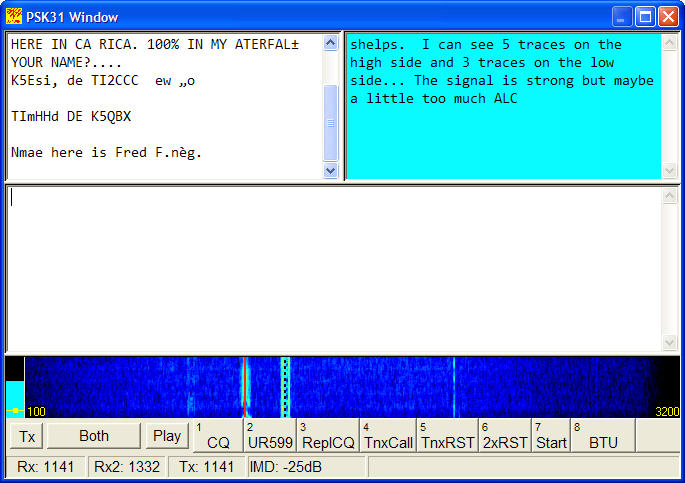
For those of you who might not have seen PSK31 in action, the screenshot here from DX4WIN shows that I've got two different QSOs that I'm decoding "listening to" at the same time, with the window on the left being the primary frequency (meaning that if I were to transmit, it would transmit there) and the window on the right showing a secondary frequency QSO. Note again that this is all done in software, the radio is actually in SSB mode and all the magic happens on the computer. Some of the more advanced programs are capable of decoding many more conversations at once.

For RTTY use, MMTTY is the way to go. MMTTY is definitely the cream of the crop here, and has all the bells and whistles you could ever want. The author of MMTTY, Mako (JE3HHT) has
allowed programmers to integrate MMTTY into their programs, so it's very well supported by most logging programs (both DX4WIN and the N1MM loggers that I user support it), but it can also be used as a standalone program. In fact, the standalone program has support built in for at least a few popular contests, and I have on occasion done a RTTY contest entirely with MMTTY (though usually at the end I export the logs and import them into N1MM for score computation and DX4WIN to track everything else). There's a lot to learn about this powerful program, and aside from the information on the authors website, I highly recommend the AA5AU RTTY page, which walks you though how to use MMTTY as well as giving a general explanation about what RTTY is.

Of course, there is another very well-known mode that I think can be called digital: CW. Both of my two main logging programs support sending CW directly from the program, either with macros o
r via the keyboard. N1MM has a very high degree of integration in that it's easy to configure macros to use during a contest that will take the callsign that you've just entered and put it into a macro along with the contest exchange, including things like a changing serial number.

However, I do use one standalone tool (which can run along with my loggers) to help me copy CW. Although I know that my CW copying skills have improved, they have quite a long way to go before I'll be able to comfortably and confidently copy even a formatted contest exchange at high (30+ wpm) speeds. Although I can copy, by ear, certain elements of an exchange (like my callsign,
typical RST reports, key phrases like "UP" or "AGN?"), for contest use and (less often) for working DX contacts I will use a CW reader program called CwGet. I've been using CwGet for several years now, though I have been able to rely on it less and less as time passes. What it's really good for, as far as I'm concerned, is to help me make sure that I've got a callsign correct or a complex contest exchange correct. As much as I wish that I could be like my friend Larry, N4VA, who seems to be able to carry on a CW QSO and hold a conversation with someone in the room at the same time, I'm just not quite there yet, and I admit to using CwGet as a security blanket.

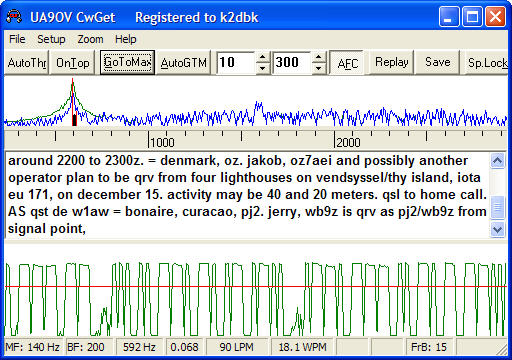
To explain what's shown in the screen shot, there are 3 window on the screen: The top window shows where in the bandpass CwGet is "listening" (in this case, it's at 592Hz, which is the audio tone my receiving is generating for the CW being received), the second window shows the decoded text, and the bottom window shows the dihs and dahs coming in. The red horizontal line is essentially a "squelch", meaning that anything below that line will be ignored. In the particular screenshot here, CwGet is copying the weekly DX Bulletin from the ARRL. (This was from their 40m broadcast, and given that I've relatively close to ARRL HQ, it's a very strong signal, so the decoding is perfect; this isn't always the case.)

Incidentally, both CwGet and the PSK31 decoder have some other interesting uses: A while ago, there was an odd hum on the output of one of the local 2m FM repeaters. I fed the audio into CwGet and I was able to figure out that what I was hearing was the CTCSS (PL) tone for that repeater, which was just a bit louder than it should have been.

I've got one more part in this series, where I'll talk about a few miscellaneous tools that didn't fit into any of the previous categories.

Monday, December 10, 2007

Tools for Ham Radio - Part 2

This is the second in a series of posts (the first is here) where I'll be talking about the tools that I use for ham radio.

The Propagation Tools
I am, by no stretch of the imagination, a propagation expert. However, I have learned a little bit about how propagation works and what some of the magic numbers mean. If you want to learn more about propagation, I highly recommend picking up a copy of The NEW Shortwave Propagation Handbook and do a web search in your favorite search engine
for '"HF propagation" introduction' (link searches on Google).

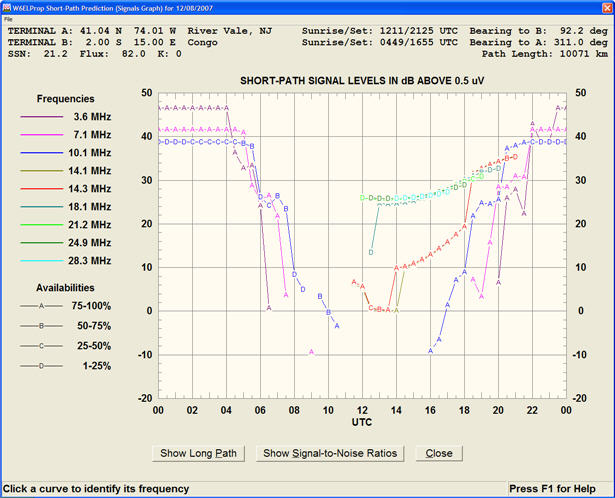
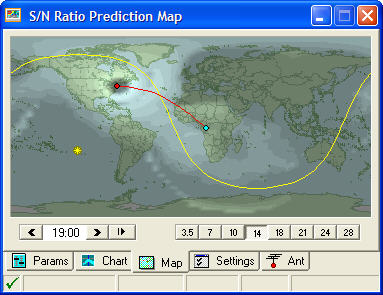
The tool that I probably use the most is W6ELProp, written by Shel, W6EL. The basic model of
operation is that you give W6ELprop two endpoints (usually your location and the location of some stations that you'd like to work; in the image captured here I've used my home location and Congo (TN) in Africa) and some information about the current propagation conditions (which are available from many sources; I'll discuss that in another post). Oversimplifying a bit, what W6ELProp does is to calculate when you're most likely to be able to make contact with that station and which band you should use. Actually, it shows predictions for all times of day and for whatever bands you've requested. You get to make the decision as to what's the best time to operate. Like other propagation tools, I use this as a guide. I've found times when it's apparently 100% accurate (in other words, I heard the station I was looking for, when and where predicted), but I've also found times when I couldn't hear a peep and, happily, I've heard stations booming in when the predictions said they shouldn't be there at all. Just because a propagation tools says there isn't propagation remember that it is only a prediction based on an imperfect model.

Incidentally, the screenshot here is just one of a number of different ways to display the data. There are tables, graphs, and maps available, all of which have their individual use. The best way to learn which works for you is to play around with it a bit.

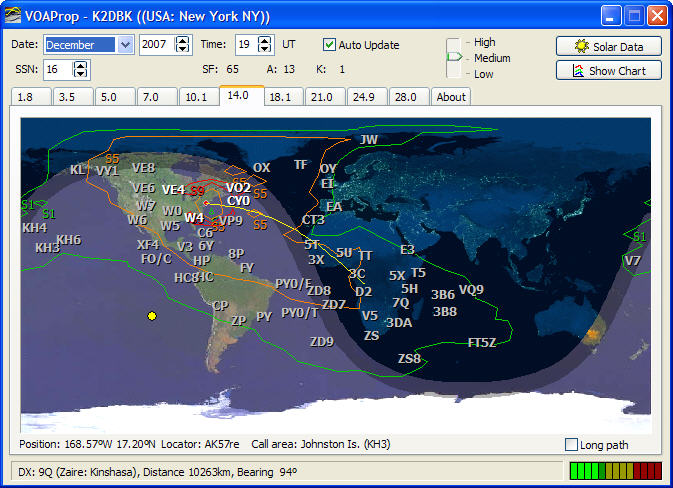
The next tool I use is called VOAProp, written by Julian, G4ILO. VOAProp is a graphical front-end for VOACAP, a HF propagation prediction "engine" originally written to support the Voice Of America broadcasts. VOACAP is very powerful, but not very user-friendly, so Julian built this great graphical front end for it. The model for VOAProp is a bit different than W6ELProp: Where W6ELprop is most useful for a scenario where you'd like to know when and where to work a particular location, VOAProp is most useful for answering the question "at a given time and band, what stations am I most like to be able to contact?". You can do the same thing with either of the two tools I've mentioned so far (and in the screen capture shown here, I am pointing specifically to Africa as I did with W6ELProp; the bars on the lower right-hand part of the screen show that decent propagation is predicted, and in fact, I can hear a TN station at this time.) VOAProp has some nice features, including the ability to automatically fetch the propagation information from sources on the Internet (you have to manually enter it into W6ELProp)

The next tool that I use is called HamCAP, written by Alex, VE3NEA. Like VOAProp, HamCAP is
also based on the VOAPROP propagation engine. The graphics in HamCAP show where propagation is available graphically similar to VOAProp. It can be used to produce predictions to a particularly location on top of the general map, which is what's being shown in the screen capture here. (Again, showing the path from K2DBK to TN.) The lighter areas are where propagation is better, and you'll note that there's no skip propagation show local to me on 20 meters, which is what this image shows.

The reason why I first started using HamCAP was because it could produce a set of prediction charts for various times and bands in a form that could be uploaded to a website for a DXpedition.
I used it to produce this set of propagation prediction charts for my ZF2DK operation earlier this year. (Click on different times and bands to see what the propagation would have been; remember that the dates for this were at the end of July 2007, so things are likely to be different now.) Incidentally, I want to point out that although I assisted Alex with fixing some minor problems with the display in browsers other than IE, he did all the hard work, I just tweaked a teeny bit of javascript.

I have a couple of final comments about these tools: First, I've really glossed over their capabilities. Download them and try them yourself to see what they can really do. (Psst ... they are all free!) Don't expect to learn everything about them in a few minutes, but the investment in time will be worth it. Second, as I mentioned before, bear in mind that all these tools can do is to predict, using mathematical models. The models aren't perfect, and neither is the data that you'll be feeding into them. So use the output from these tools with that in mind. Just because the tools predict no propagation the only way you'll know for sure is to get on the air.

Thursday, December 06, 2007

Tools for Ham Radio - Part 1

As hams, most of us have at least a small toolbox that we use to maintain our stations. Others have a much bigger collection of tools that they use to build and troubleshoot things.

But for the next few postings, I'd like to talk about a different kind of toolbox: a software toolbox.

Just like the one in the picture, my ham radio software toolbox has several compartments and different types of tools, depending on the job that I want to do. I'll describe a few of the compartments that I have and the tools that I use. Before I start, I will say that these are tools that I've found work for me. There may be tools that work better for you (and there are are probably some that would work better for me too, but you have to start somewhere.) Since I'm a Windows XP user, everything I'll discuss runs on that platform. (Sorry to the Mac and Linux guys.) I have no financial interest in any of the software that I'll talk about, other than in the case of the commercial products, I'd sure like to see those companies stay around for a while. So let's go see what's in the toolbox.

The Logging Tools

For the most part, I use two different types of tools, depending on why I'm logging contacts. I guess I consider myself a DXer first, so I use a DX logging program that I've found works well for me, which is DX4WIN. (Hmm, seems that their home page is a bit out of date. Fortunately, the software isn't.) DX4WIN allows me to track progress towards awards like DXCC, IOTA, and WAS (and many more), and does a nice job handling QSLing chores. It has reasonable integration with Logbook of The World, and is able to import and export information in a wide variety of formats. That's important, because I import data into DX4WIN from my contest logging program (more about that in a bit), and occasionally I'll even need to export from DX4WIN to my contest logger. I consider this my primary logging program, and everything that I log eventually winds up in DX4WIN.

The other logging tool type I use is when I'm participating in a contest. For that, I use the amazing N1MM Logger. N1MM (the logger, not Tom, N1MM) is rapidly becoming the choice of a lot of very serious contest stations because of it's flexibility, power, and support, but I find it great to use for my casual contesting as well. It can integrate with multiple radios, has built-in CW and voice keyers, can work with network connected multi-op stations, and, well, just about does everything about contesting really well. As if that wasn't enough, it's freeware and open source. (I actually did a couple of very small pieces to support Icom radios back when it wasn't as well known.) As I mentioned before, the main repository for all my QSL data is DX4WIN, so when I finish a contest, I export the data in a number of formats that I need, including Cabrillo for the contest submission, and ADIF for uploading to Logbook of The World and importing into DX4WIN. Just a couple of mouse clicks is all it takes.

One of the things that's really nice about being able to move data between the programs is that occasionally I'll decide to just make a couple of contacts in a contest to "give out points", and I'll start off using DX4WIN. (This is especially true during some of the DX contests when I know I won't really have a lot of time to participte, but find that there's some really good DX to chase. This also only works when there's a relatively simple contest exchange, since DX4WIN isn't well-suited to keeping track of complex contest exchanges). At the end of the contest, since I'm going to submit my log anyway, I'll export the data from DX4WIN into N1MM, and allow N1MM to do all the scoring duties and produce the required Cabrillo format file. It literally takes me less time to do the export/import process than it's taken me to type this paragraph (and I'm a fairly decent typist).

When I began to write this entry, I figured that I'd be able to cover all of the "compartments" that I wanted to discuss in a single entry, but I've realized that it's going to take more to cover everything, so this will be the first is a short series. Among the other compartments that I'll discuss (not necessarily in this order) will be the propagation compartment, the digital modes compartment, and maybe a few others.

See you next time.